
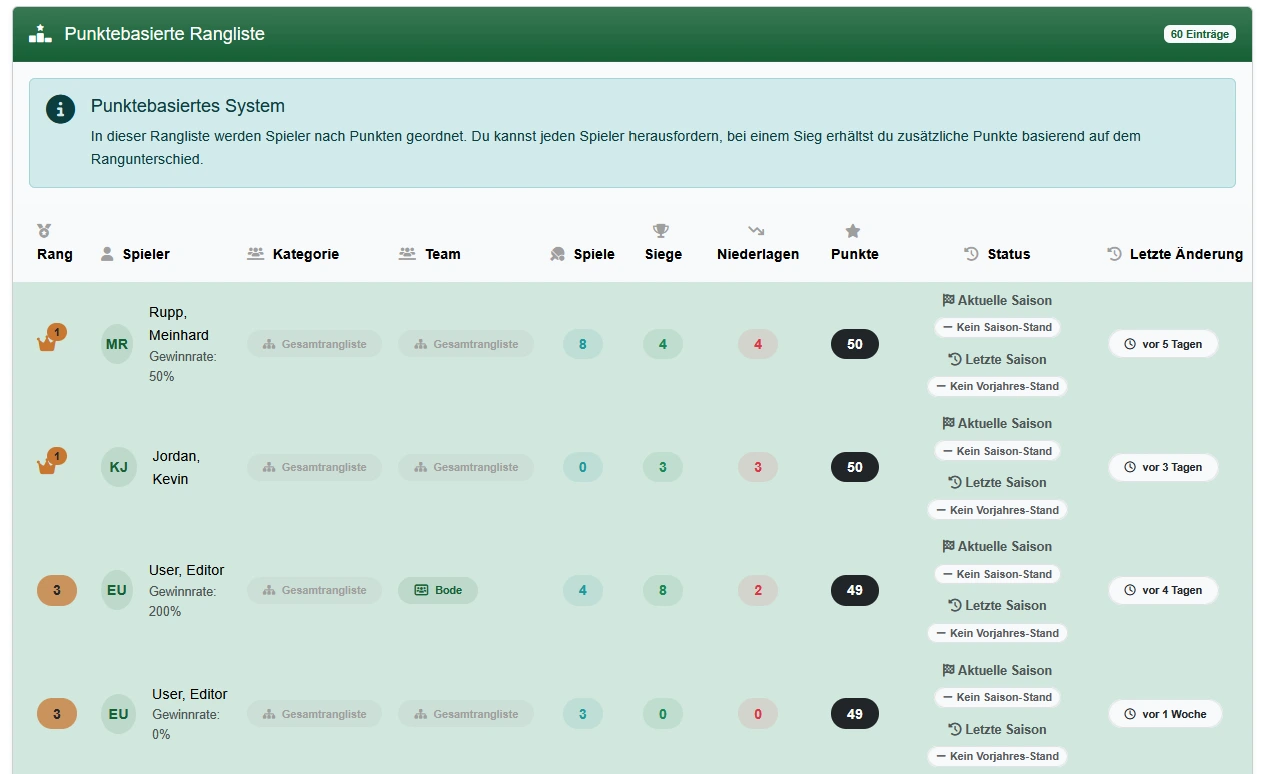
Challenge ladder system
The tennis challenge ladder system: from challenge to ranking change
e-MasterClub runs the full challenge ladder process in one place: creating a challenge, scheduling, court booking, result validation, sports-director approval, and the ranking update, with a complete history.
- Challenges, scheduling, and court booking run in one workflow
- Results are validated before the ranking changes
- Sports director approval with a transparent history
Digital challenges
Validated results
Full history
Processes, permissions, and rules in one interface
What is a tennis challenge ladder system?
A challenge ladder system is the digital version of the club custom where members formally challenge each other for a ranking match. It runs the process end to end: a player creates a challenge, both sides agree on a date, the match is booked on the regular court calendar, the result is entered and validated, the sports director gives final approval, and the ranking updates automatically. Every step is recorded, so a dispute can be resolved by checking the history instead of asking around.
Where challenge matches break down without a system
Chat messages work for a handful of challenges. Beyond that, scheduling, results, and the ranking all become manual work for the sports director.
Challenges get lost in chats
A challenge issued by message is easy to miss, forget, or dispute later, especially once several ladders run in parallel.
Results are reported informally
Without a validation step, a result relayed secondhand to the sports director is hard to check once there's a disagreement.
The ranking is a manual spreadsheet
Updating a ranking table by hand after every match is slow and creates a version that only one person maintains.
The challenge process, step by step
From the first challenge to the ranking change, with a full history behind it.
1. Create a challenge
A player or team issues a challenge digitally, within the rules and categories configured for your club's ladder.
2. Coordinate a date
Both sides agree on a date directly in the system, instead of negotiating back and forth in a chat.
3. Book the court
The match is booked on the regular court calendar and follows the same booking rules as any other reservation.
4. Accept or decline
The challenged side accepts or declines within the ladder rules, and the decision is recorded.
5. Enter the result
The match result is entered into the system after play, replacing a scrap of paper or a message to the sports director.
6. Result validation
The result is checked before it takes effect, so a disputed or incomplete entry doesn't change the ranking automatically.
7. Sports director approval
The sports director gives final approval, keeping oversight of the ladder without processing every step by hand.
8. Ranking changes
Once approved, the ranking updates automatically and the result of the challenge is reflected immediately.
9. History
Every challenge, its result, and the ranking change it caused stay in a traceable history for later reference.
Rules, categories, and administration
What the sports director configures and controls around the challenge process.
Configurable rules
Challenge windows, response deadlines, and ranking logic are configured for your club and then apply automatically to everyone.
Categories
Challenges run within categories, so different groups or levels keep their own ladder instead of one mixed list.
Singles and team formats
Depending on your club's configuration, challenges and results are tracked for individual players or for teams.
Notifications
Players and the sports director are notified as a challenge moves through scheduling, result entry, and approval.
Feedback
Players can flag an issue with a match or result, giving the sports director context before a final decision.
Administration
The sports director administers rules, categories, and disputed cases from one place instead of juggling chats and paper.
Every challenge match books a court through court booking and uses the same membership data as the rest of the club. It shares its ranking and member data with tournament management. See the full picture on the features overview.
Frequently asked questions about the challenge ladder system
Direct answers about challenges, scheduling, results, and the ranking.
A member issues a challenge against another player or team within the ranking rules. Both sides then coordinate a date directly in the system instead of over chat.
Once a date is agreed, the match is booked on the regular court calendar, so it follows the same booking rules as any other reservation and doesn't collide with other bookings.
Yes. The challenged player or team can accept or decline within the rules of your club's ladder, and the decision is recorded in the system.
Results are entered after the match and validated before they take effect. The sports director gives final approval, so the ranking only changes on a confirmed result.
Challenges run within configured rules and categories, for example separate ladders per category or format, singles or team, depending on how your club sets it up.
Players and the sports director are notified as a challenge moves through scheduling, result entry, and approval, so no one has to chase updates manually.
Yes. Every challenge, its result, and the resulting ranking change stay in a traceable history, so disputes can be resolved by looking at the record instead of memory.
Next step
See the challenge ladder system live
Request a demo and check how challenges, scheduling, results, and the ranking would run for your club.