
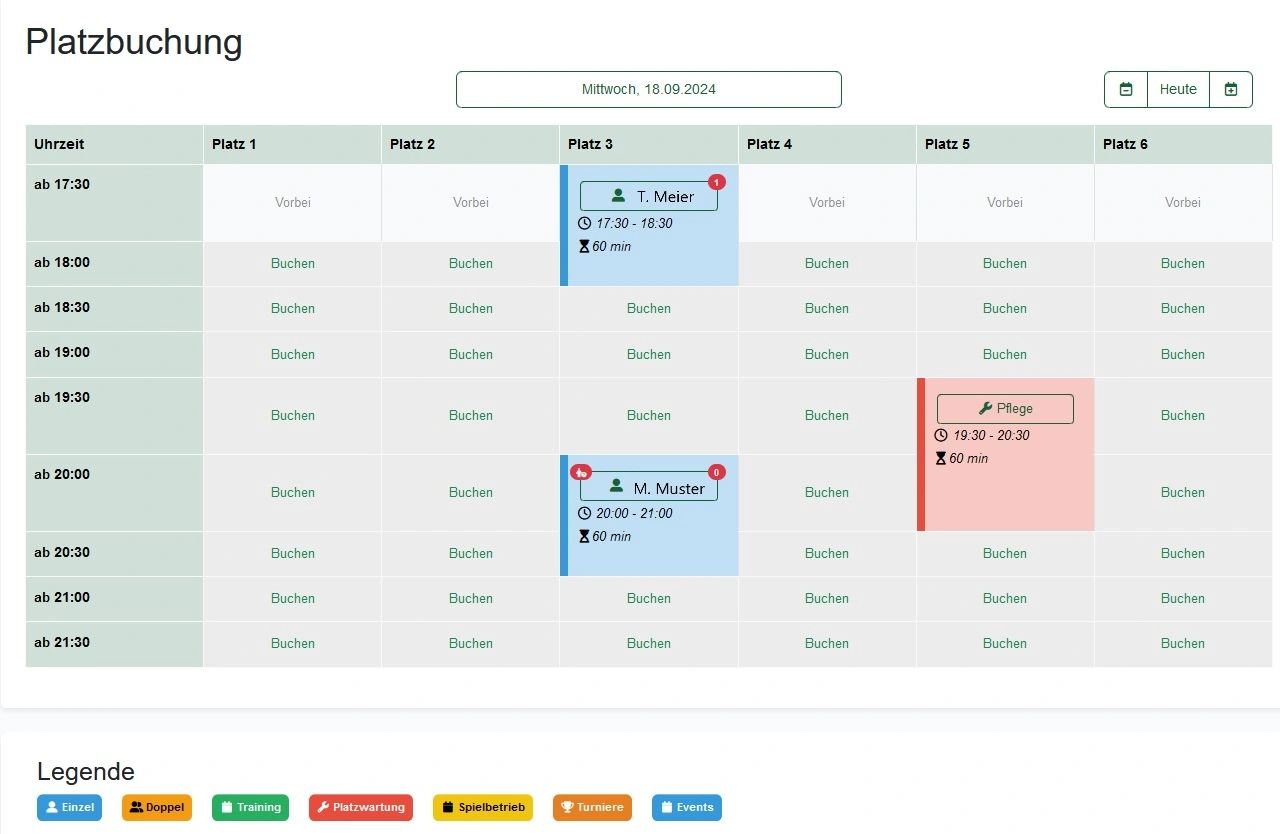
Tennis court booking system
Court booking for tennis clubs: online booking without double bookings
e-MasterClub's tennis court booking system shows real-time availability and enforces your club's booking rules automatically, so conflicts over court times stop being a weekly discussion.
- Real-time calendar for every court
- Booking limits and advance-booking windows enforced automatically
- Double bookings are prevented at the moment of booking
Live availability
No double bookings
Rules configured per club
Processes, permissions, and rules in one interface
What is a tennis court booking system?
A tennis court booking system is software that lets members reserve courts online in a real-time calendar while automatically enforcing your club's rules: booking limits per member, advance-booking windows, and blackout times. Instead of a shared spreadsheet that has to be checked and corrected by hand, the system confirms only bookings that are actually valid, which removes double bookings and most disputes about exceptions.
Where court booking breaks down without a system
A shared list is enough for a handful of members. Beyond that, it produces conflicts that land on the board every week.
Double bookings and disputes
A shared list or spreadsheet can't stop two members from claiming the same slot, so someone always has to sort it out afterwards.
Rules that only apply on paper
Booking limits and advance-booking windows exist, but without automatic enforcement, exceptions are made informally and inconsistently.
No real-time overview
Without live availability, members call or message the office to find out whether a court is actually free right now.
What the court booking system does, in detail
Every rule is configured once for your club and then applies automatically for all members.
Real-time availability calendar
All courts and time slots are visible live. Members book directly, without a phone call or a message to the office.
See it in the demoAutomatic double-booking prevention
Every booking request is checked against the calendar the moment it is made, so a slot can only be confirmed once.
See it in the demoLimits and advance-booking rules
Booking limits per member, advance-booking windows, and blackout times are configured once and then apply automatically for everyone.
See it in the demoRecurring bookings
Fixed weekly slots, for example for training or regular pairings, are set up once as a recurring booking within your club's limits.
See it in the demoGuest player rules
Guest bookings follow the rules your club defines, so guests can play without giving up control over court usage.
See it in the demoBilling for bookings and add-ons
Court fees and add-on services are captured together with the booking, so charges stay traceable for the treasurer.
More about club billingHow clubs use online court booking day to day
Peak-time fairness
On weekday evenings and weekends, booking limits stop a few members from occupying every popular slot.
Fixed training slots
Recurring bookings reserve courts for training groups without re-entering the same slot every week.
Guests and trial players
Guest rules let members bring visitors without losing track of who is on the court and when.
Court booking connects directly with membership management and club billing, so booking rules, member records, and fees stay on one data foundation. See the full picture on the features overview.
Frequently asked questions about court booking
Direct answers about double bookings, guest players, and recurring reservations.
Members log in and see all courts in a real-time calendar. They select a free slot and book it directly. The rule engine checks limits and advance-booking windows automatically before the booking is confirmed.
Every booking is checked against the calendar and your club's rules at the moment it is made. A slot that is already reserved cannot be booked again, which removes the manual back-and-forth of clearing conflicting entries in a shared list.
Guest bookings can be configured according to your club's own rules, for example limited to specific time windows or requiring a member to book on their behalf, so the board keeps control over who plays when.
Fixed weekly slots such as training blocks or regular pairings can be set up as recurring bookings within your club's configured limits, instead of being re-entered manually every week.
Yes. Booking windows, limits, and blackout times are configured as rules and can differ by court, time period, or member group.
Next step
See the court booking system live
Request a demo and check how booking limits, advance-booking rules, and double-booking prevention would work for your club.